

Ham44 — Android CTF Challenge Writeup

Author: gr00t
Introduction
Recently, I got the opportunity to build an Android challenge for a CTF organized by my Team NOVA. This was actually my first time designing a medium-level Android challenge, so it was both exciting and a bit challenging to balance the difficulty.
The challenge was called Ham44 — yes, the name comes from Sir Lewis Hamilton, one of my favorite Formula 1 drivers! 🏎️
The challenge included several Android security concepts:
- A hidden activity
- An encrypted flag retrieval from a gRPC server
Interestingly, the challenge ended up with 0 official solves, but a team from Amrita Vishwa Vidyapeetham, Coimbatore managed to solve it in the intended way. Unfortunately, they ran out of time before submitting. Still, huge congratulations to them — that was impressive work.
In this blog, I'll walk through the intended solution path for the challenge.
Challenge Description
Ham44 As part of a campus promotion for F1 by KICTF, a small Android app began circulating among students. It appears to be nothing more than a simple media demo that plays a familiar song on launch. Just simple right? Author: gr00t Flag Format:
KICTF{...}APK: Download Here
The challenge description does not reveal much. The only hint given is: "Just simple right?" This is meant to subtly indicate that the application is not as simple as it appears.
Step 1 — Installing the APK
First, we need to install the APK on a device or emulator.
adb install Ham44.apk
When we launch the application, we immediately notice something unusual. The app only plays a Lewis Hamilton edit video when opened.

There are:
- No buttons
- No menus
- No visible features
The user can only open the app and close it. At first glance, it looks like a simple video app. But since this is a CTF challenge, we know that the real functionality must be hidden somewhere beneath the surface.
Step 2 — Inspecting the APK
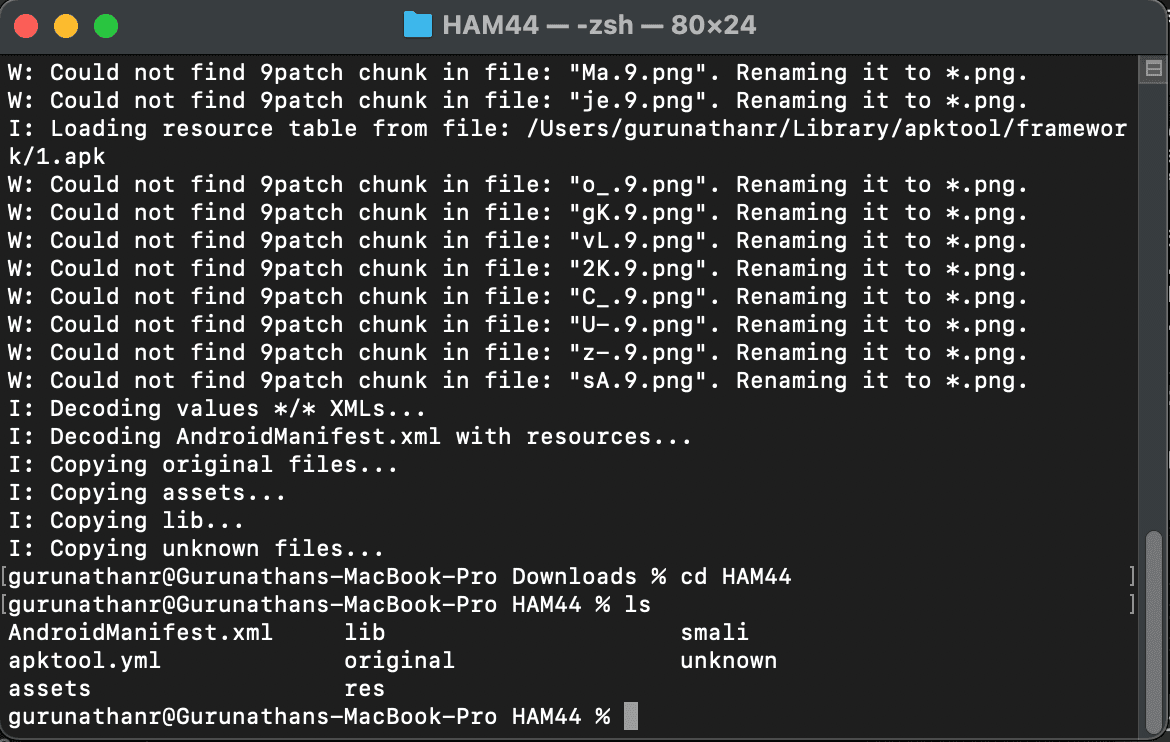
Since the UI gives us nothing to work with, the next logical step is static analysis. An Android APK is essentially a ZIP archive. We can unpack it using apktool to inspect the files:
apktool -d Ham44.apk
Understanding Android APK Structure
A typical Android APK contains several important components:
- AndroidManifest.xml: This acts as the configuration file for the entire app. It defines Activities, Permissions, Application components, and Intent filters.
- classes.dex: This contains the compiled Java/Kotlin bytecode.
- res/: This folder contains layout files, images, and UI resources.
- assets/: An optional directory containing extra files used by the application.
Step 3 — Inspecting the Manifest & Decompiling
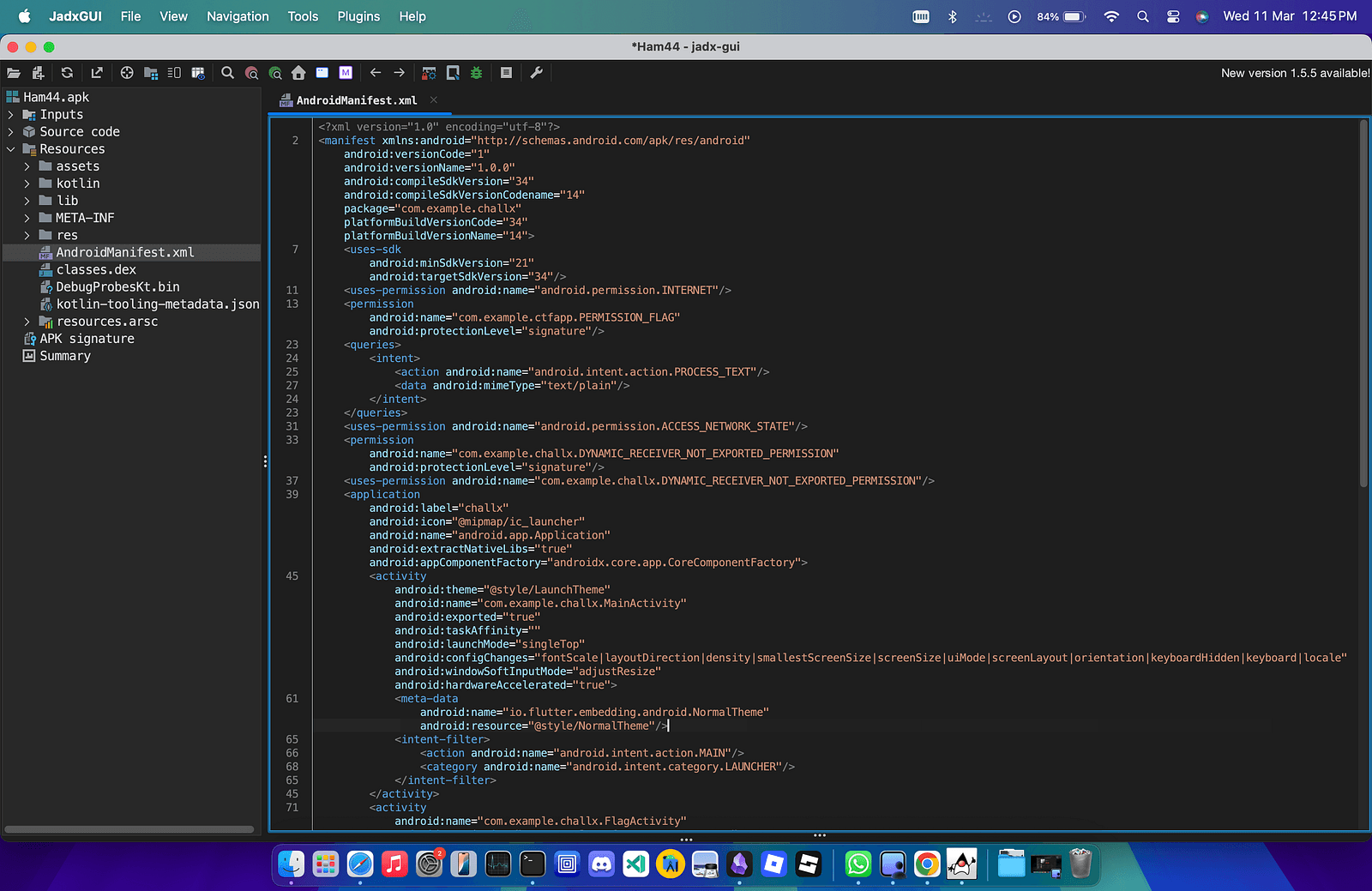
While exploring the extracted files, we notice something interesting: the Manifest file and class names appear obfuscated, which makes manual analysis a bit harder.
To better understand the application logic, we can decompile the APK using JADX. JADX converts the compiled bytecode back into readable Java code.
jadx-gui Ham44.apk
Step 4 — Discovering the Hidden Activity
Inside the AndroidManifest.xml, we find a major clue. There is another activity defined in the application:
<activity
    android:name="com.example.challx.FlagActivity"
    android:permission="com.example.ctfapp.PERMISSON_FLAG"
    android:exported="true">
    <intent-filter>
        <action android:name="com.example.ctfapp.OPEN_FLAG"/>
        <category android:name="android.intent.category.DEFAULT"/>
    </intent-filter>
</activity>
The main thing standing out here is that the Activity is Exported (android:exported="true").
This means the activity can be launched by external applications. Even if the UI does not expose it, we can still trigger it manually!
Step 5 — Launching the Hidden Activity
Since the activity is exported, we can start it manually using ADB. (Note: I am using a rooted Android emulator for this step).
adb root
adb shell am start -n com.example.challx/.FlagActivity
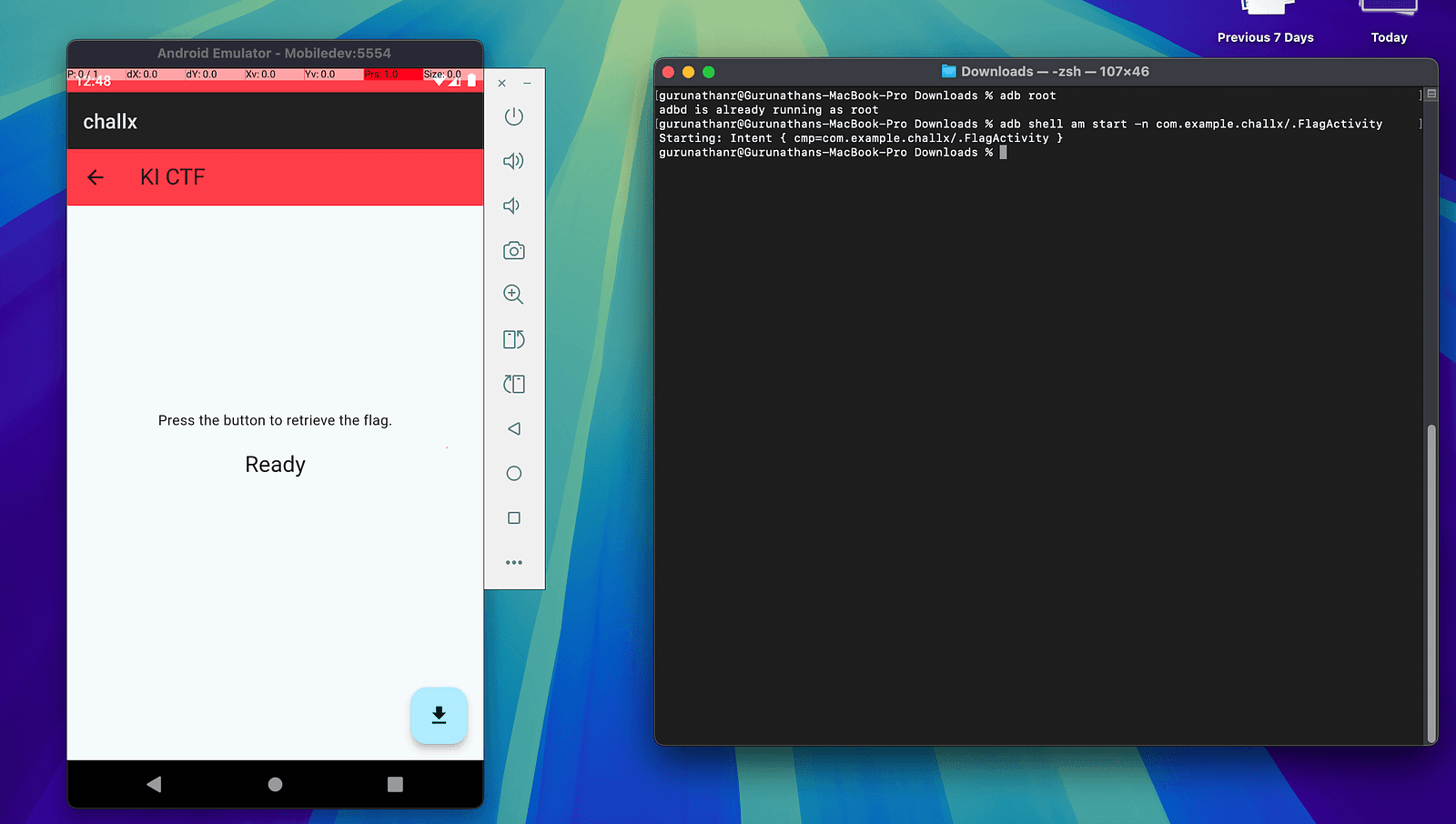
Success! Suddenly, a new screen appears in the application. This screen contains a single Download button.
Step 6 — Retrieving the Flag
Clicking the Download button triggers a request to the backend gRPC server and returns a value. At first glance, it looks promising, but after examining the result, we realize this is not the actual flag.
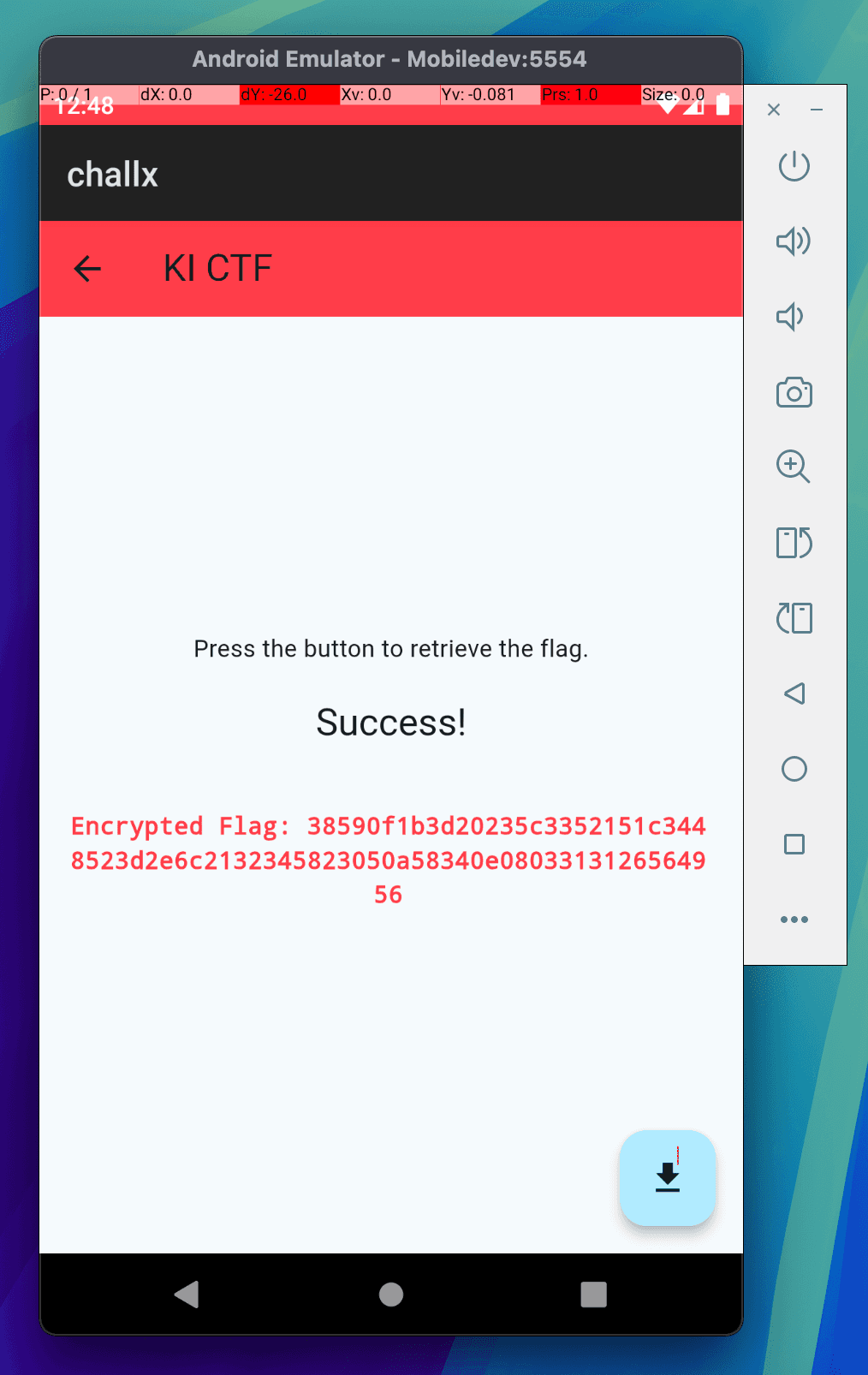
Instead, we receive an encrypted hex string: 38590f1b3d20235c3352151c3448523d2e6c2132345823050a58340e0803313126564956
Now, the challenge pivots to cryptanalysis.
Step 7 — Identifying the Encryption
From the challenge description, we already know something important—the flag format is: KICTF{...}
This gives us a known plaintext, allowing us to attempt a known-plaintext attack. A common encryption used in CTF challenges is repeating XOR.
The rule for XOR encryption is: Ciphertext ⊕ Plaintext = Key
If we know part of the plaintext, we can potentially recover the key.
Step 8 — Discovering the Base64 Layer
Initially, XORing the ciphertext directly with KICTF{ produces non-printable characters. This suggests that another encoding layer was applied before XOR encryption.
A common candidate in such challenges is Base64. Encoding KICTF{ in Base64 gives: S0lDVEZ7
Now, if we XOR the first 8 bytes of our hex ciphertext with this Base64 string, it reveals a repeating pattern: kic_keyk
This strongly suggests that the repeating XOR key is: kic_key
Step 9 — Decrypting the Flag
Now that we have all the pieces of the puzzle:
- Ciphertext (hex)
- Encryption method: Repeating XOR
- XOR key:
kic_key - Additional encoding: Base64
We can fully reverse the encryption! Below is the Python script used to decrypt the flag:
import base64

# Ciphertext shown in the app
encrypted_hex = "38590f1b3d20235c3352151c3448523d2e6c2132345823050a58340e0803313126564956"

# Recovered repeating XOR key
xor_key = "kic_key"

# Step 1: Convert hex string to bytes
xored_bytes = bytes.fromhex(encrypted_hex)

# Step 2: XOR-decrypt using repeating key
key_bytes = xor_key.encode("utf-8")
b64_bytes = bytes(b ^ key_bytes[i % len(key_bytes)] for i, b in enumerate(xored_bytes))

# Step 3: Decode Base64
flag = base64.b64decode(b64_bytes).decode("utf-8")

print(f"Congratulations! The flag is: {flag}")
Running the script produces our final target!
Final Flag
KICTF{gRpC_S3rV3r_St0r4g3}
Final Thoughts
This challenge combined multiple Android security concepts into one neat package:
- Hidden Activities
- Exported Components
- Backend Communication via gRPC
- Cryptographic Reversal
Even though the app appeared extremely simple at first glance, deeper inspection revealed multiple layers of logic. That is often the key lesson in mobile security challenges: What you see in the UI is rarely the whole story. There is almost always something hidden beneath.
This was my first time building an Android CTF challenge, and it was a great learning experience designing the vulnerability chain.
Hopefully, you enjoyed this walkthrough!
- gr00t